Posts

uaa-on-serverless

在windows中使用docker有多种方式: docker WIN10 desktop WSL 本文主要介绍在WSL中使用docker 前提条件 Windows 10 Version 1803以上(支持cgroups) Ubuntu for WSL 16.0.4 LTS(WSL支持的最新版本) Docker 17.09 安装WSL install WSL WSL 命令行和默认 shell cmd:\>wsl wubigo:/tmp/docker-desktop-root/mnt/host/d/code#/etc# cat /etc/wsl.conf [automount] root = /mnt/host crossDistro = true options = "metadata" WSL DOCKER磁盘卷路径 cmd:\>docker volume inspect edgex_consul-config [ { "CreatedAt": "2022-03-07T08:04:34Z", "Driver": "local", "Labels": { "com.docker.compose.project": "edgex", "com.docker.compose.version": "2.2.3", "com.docker.compose.volume": "consul-config" }, "Mountpoint": "/var/lib/docker/volumes/edgex_consul-config/_data", "Name": "edgex_consul-config", "Options": null, "Scope": "local" } ] \\wsl$\docker-desktop-data\version-pack-data\community\docker\volumes\

昨天看到AWS STEP FUNCTIONS支持嵌套的工作流 ,当时就被震惊了。 AWS早些年推出SWF框架提供工作流服务, 后来工作流服务就没有大的工作,SWF框架的核心开发者一部分 离职去了UBER开发Cadence。没想到沉寂了多年的AWS会在STEP FUNCTIONS 支持工作流,看来这个千亿规模的市场又快被颠覆了。 20多年来,工作流都是超大型企业的配置专利,而STEP function的推出 可以预计,高大上的工作流服务会很快走进很多中小企业工作台并被普及应用。 回顾一下自己的工作历史: 从以前的数据中心服务器SA(2006), 到虚拟主机ESX, 再到OPENSTACK(2010)搭建混合云, 然后利用K8S(2014)搭建PaaS,现在SERVERLESS, 计算架构正在发生快速的演进。本文梳理了算力演进历史和未来 内容 从虚拟主机到容器 从容器到unikernel 函数计算的蓬勃发展 什么是虚拟计算 hypervisor分类 Type-1 裸机 KVM, QEMU, VMWare, Virtualbox Type-2 托管 XenServer, Hyper-v, KVM, ESX, Xen 虚拟机的问题 贵 一台云主机(8G/4Core/500MBps)在2017年的超过6000元/年 操作慢 一个普通的镜像在2G左右,再加上JAVA应用,一个镜像需要10G. 启动,备份非常不便。 容器计算 |虚拟机| 容器 |:—|:—|:—| 构件| 完整的操作系统和应用| 微内核和应用 虚拟技术| 硬件虚拟化| 操作系统虚拟化 容器计算带来什么好处 容器镜像小 alpine的容量是2M

AWS Step Functions VS

Adds Support for Nested Workflows

https://news.ycombinator.com/item?id=20726906

ISP Starter Kit

http://www.wispa.org/Resources/HOW-TO-START-A-WISP

wireless fiber

5G mobile broadband

https://www.huawei.com/en/press-events/news/2019/1/huawei-releases-wireless-fiber-solution

https://www.techdirt.com/articles/20190904/08392642916/colorado-town-offers-1-gbps-60-after-years-battling-comcast.shtml

DOCKER DEAMON PROXY

  • systemd level

/etc/systemd/system/docker.service.d/https-proxy.conf

[Service]
Environment="http_proxy=http://127.0.0.1:8123" "https_proxy=https://127.0.0.1:8123" "NO_PROXY=registry-1.docker.io"
sudo systemctl daemon-reload
sudo systemctl restart docker
  • service level

/etc/default/docker

export http_proxy="http://127.0.0.1:3128/"
  • daemon level

/etc/docker/daemon

DOCKER CLIENT PROXY

~/.docker/config.json

       "proxies":{
                "default":{}
        }

[TOC] AWS领先的设计理念和强大的技术生态 使你身陷其中,学习你要用它,开发你要 用它,上线还要用它。 一年下来项目还没有 正式商用,已经有十几万的研发费用。 今天向你推荐 localstack(与openstack啥关系?私有云+公有云), 让你使用AWS免费,至少在项目POC或开发测试阶段免费。 有了它, 你不用再焦急的等待老板审批公有云的 计算,存储,数据库资源开发申请。 是不是这个项目听起来很激动? 那如何使用localstack呢? 安装localstack localstack是一个非常活跃的正在快速成长中的项目, 建议通过源代码安装 下载源代码 git clone [email protected]:localstack/localstack.git git fetch --all git checkout tags/v0.10.3 -b v0.10.3 启用需要使用的AWS服务 修改配置文件,启用你需要使用的AWS服务:ec2,s3,iot,kafka等。 注意服务的名字必须来自服务名字列表, 否则不识别 启用服务就是修改下边的配置文件 localstack\docker-compose.yml SERVICES=${SERVICES-ec2,ecs,stepfunctions,iam,lambda,dynamodb,apigateway,s3,sns} DATA_DIR=${DATA_DIR-/tmp/localstack/data } volumes: - "${TMPDIR:-d:/tmp/localstack}:/tmp/localstack" make sure driver D is shared in docker desktop daemon docker-compose up localstack_1 | Starting mock S3 (http port 4572)... localstack_1 | Starting mock SNS (http port 4575).

工业物联网OSI参考模型

软件接口	            OPC
应用层	              ModBus
数据链路层	          CAN,ProfiBus
物理层	              RS232,RS485

OPC服务器

OPC SERVER = OPC驱动器

OPC

简单来说,OPC是一套标准,其目的是把PLC特定的协议(如Modbus,Profibus等)抽象成为标准化的接口,作为“中间人”的角色把通用的OPC“读写”请求转换成具体的设备协议来与HMI/SCADA系统直接对接

When the standard was first released in 1996, its purpose was to abstract PLC specific protocols (such as Modbus, Profibus, etc.) into a standardized interface allowing HMI/SCADA systems to interface with a “middle-man” who would convert generic-OPC read/write requests into device-specific requests and vice-versa.

注册用户 /etc/matrix-synapse/homeserver.yaml registration_shared_secret: sudo systemctl restart matrix-synapse 配置代理 sudo openssl req -x509 -nodes -days 365 -newkey rsa:2048 -keyout /etc/ssl/private/nginx-selfsigned.key -out /etc/ssl/certs/nginx-selfsigned.crt server { listen 443 ssl http2; listen [::]:443 ssl http2; # For the federation port listen 8448 ssl http2 default_server; listen [::]:8448 ssl http2 default_server; ssl_certificate /etc/ssl/certs/nginx-selfsigned.crt; ssl_certificate_key /etc/ssl/private/nginx-selfsigned.key; location ~* ^(\/_matrix|\/_synapse\/client) { proxy_pass http://localhost:8008; proxy_set_header X-Forwarded-For $remote_addr; proxy_set_header X-Forwarded-Proto $scheme; proxy_set_header Host $host; # Nginx by default only allows file uploads up to 1M in size # Increase client_max_body_size to match max_upload_size defined in homeserver.

配置

  • 下载B2 TLS安全证书

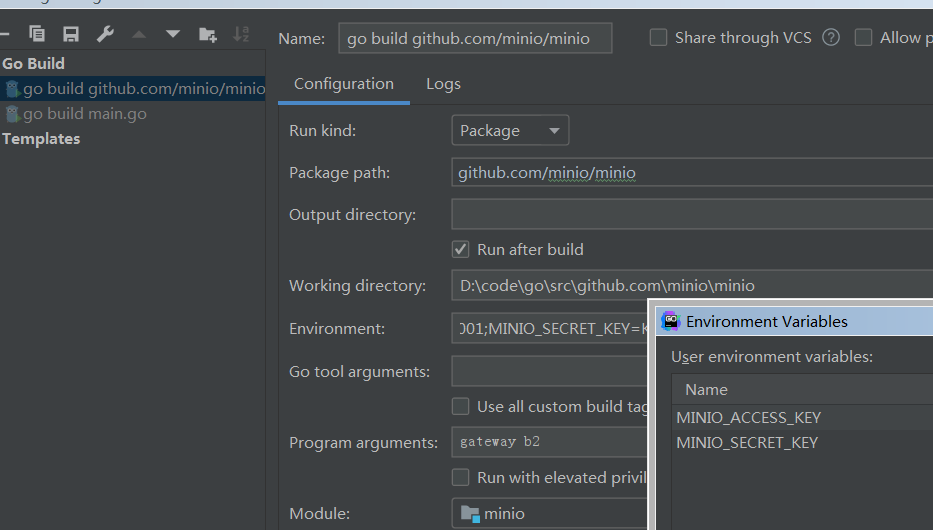
    openssl s_client -showcerts -connect api.backblazeb2.com:443 > b2.crt
    
    mv b2.crt .minio/certs/CAs/
    
    set MINIO_ACCESS_KEY=B2_keyID
    set MINIO_SECRET_KEY=B2_applicationKey
    minio gateway b2
    

deploy VUE app under myweb context path server { listen 80; server_name 127.0.0.1; #listen 443 ssl; location /ibms/api/ { proxy_pass http://127.0.0.1:8080/; #proxy_set_header Host $http_host; add_header Cache-Control no-cache; add_header Pragma no-cache; add_header Expires 0; proxy_connect_timeout 200s; proxy_send_timeout 200s; proxy_read_timeout 200s; proxy_set_header X-Real-IP $remote_addr; proxy_set_header X-Forwarded-For $proxy_add_x_forwarded_for; proxy_set_header sn $http_sn; #405 重新代理 error_page 405 =200 http://$host$request_uri; } location /ibms { root /var/www/html; add_header Cache-Control no-cache; add_header Pragma no-cache; add_header Expires 0; #try_files $uri $uri/ @router; try_files $uri $uri/ /ibms/index.

https://www.sdxcentral.com/networking/virtualization/definitions/how-does-micro-segmentation-help-security-explanation/

give the wireless network higher priority than the wired WIRELESS CONNECTION > "Internet Protocol Version 4 (TCP/IPv4) Properties" > advanced TCP/IP setting > Automatic metric Uncheck it. That will enable a text box named “Interface metric”. Fill in a number. It needs to be larger than 1 (reserved for loopback) and the number(30) you choose for the wired network. WIRED CONNECTION > "Internet Protocol Version 4 (TCP/IPv4) Properties" > advanced TCP/IP setting > Automatic metric Again Uncheck “Automatic metric”, and fill in a number in the “Interface metric” box.

AppInfo 启动类型必须是自动或手动, 否则,msinstaller, services.msc, regedit 等都会报错: The Service command cannot be started, either because it is disabled or because it has no enabled devices associated with it AppInfo svchost.exe Facilitates the running of interactive applications with additional administrative privileges. Users will be unable to launch applications with the additional administrative privileges they may require to perform desired user tasks. These tools include regedit. Although safe to disable, this is not recommended since you need to boot into safe mode to enable again.

微服务认证和授权有很多方案, 这里比较各种主流方案的优缺点, 为你的业务系统选择MAA方案提供指南 方案 优点 缺点 分布式会话管理 简单,成熟,服务器统一管理 扩展性比较差 客户令牌 单点登录 API网关令牌管理 第三方应用授权 SSL/TLS 双向认证 方案 分布式会话管理 会话信息由服务器存储 实现方式: Sticky session Session replication Centralized session storage 客户令牌 令牌由客户持有 JWT: 头,负载和签名 头 { "typ": "JWT", "alg": "HS256" } 负载

之前一直用pycharm,今天把code升级到1.3.2的时候, 突然提示我安装python扩展,决定试试。 结果发现python的解释器设置有问题, 总是设置为系统的解释器, 而虚拟环境的解释器不起作用。

apt remove --purge python3.5
reboot

结果ubuntu桌面启动不了。好多应用程序例如chrome,virtualbox都消失了, 造成了很大的麻烦。

Ctrl+Alt+F1进入虚拟控制台登录

apt install python3.5
apt install ubuntu-desktop

重新安装chrome和virtualbox

cd /etc/apt/sources.list.d
sudo mv google-chrome.list.save google-chrome.list
apt update
apt install google-chrome-stable

本地流线型开发

本地流线型开发

集成开发,测试部署

IDE

K8S POD Command Override OCR docker Entrypoint vs k8s command docker k8s entry ENTRYPOINT command arguments CMD args k8s command and args override the default OCR Entrypoint and Cmd Dockerfile FROM alpine:3.8 RUN apk add --no-cache curl ethtool && rm -rf /var/cache/apk/* CMD ["--version"] ENTRYPOINT ["curl"] cmd-override-pod.yaml apiVersion: v1 kind: Pod metadata: name: command-override labels: purpose: override-command spec: containers: - name: command-override-container image: bigo/curl:v1 command: ["curl"] args: ["--help"] restartPolicy: Never docker run -it bigo/curl:v1 curl 7.

Node-level Logging System component logs RUN IN CONTAINER(Y/N) Systemd(W/WO) LOGGER LOCATION kubelet and container runtime W/O /var/log kubelet and container runtime W journald scheduler Y /var/log kube-proxy Y /var/log /var/lib/kubelet/pods/<PodUID>/ /var/log/pods/<PodUID>/<container_name> ls -l /var/log/pods/<PodUID>/<container_name>/ lrwxrwxrwx 1 root root 165 3月 30 06:52 0.log -> /var/lib/docker/containers/e74eafc4b3f0cfe2e4e0462c93101244414eb3048732f409c29cc54527b4a021/e74eafc4b3f0cfe2e4e0462c93101244414eb3048732f409c29cc54527b4a021-json.log Cluster-level logging Use a node-level logging agent that runs on every node.

建筑工程施工图 具有图纸齐全、表达准确、要求具体的特点。它是设计工作的最后成果,是进行工程施工、编制施工图预算和施工组织设计的依据,也是进行施工技术管理的重要技术文件。一套完整的建筑工程施工图,一般包括建筑施工图、结构施工图、给排水、采暖通风施工图及电气施工图等专业图纸,也可将给排水、采暖通风和电气施工图合在一起统称设备施工图。 建筑施工图 简称“建施”。它一般由设计部门的建筑专业人员进行设计绘图。建筑施工图主要反映一个工程的总体布局,表明建筑物的外部形状、内部布置情况以及建筑构造、装修、材料、施工要求等,用来作为施工定位放线、内外装饰做法的依据,同时也是结构施工图和设备施工图的依据。建筑施工图包括设备说明和建筑总平面图、建筑平面图、立体图、剖面图等基本图纸以及墙身剖面图、楼梯、门窗、台阶、散水、浴厕等详图和材料做法说明等等。 结构施工图 结构施工图指的是关于承重构件的布置,使用的材料,形状,大小,及内部构造的工程图样,是承重构件以及其他受力构件施工的依据。 结构施工图包含以下内容: 结构总说明、基础布置图、承台配筋图、地梁布置图、各层柱布置图、各层柱配筋图、各层梁配筋图、屋面梁配筋图、楼梯屋面梁配筋图、各层板配筋图、屋面板配筋图、楼梯大样、节点大样 BIM BIM software is used by individuals, businesses and government agencies who plan, design, construct, operate and maintain buildings and diverse physical infrastructures, such as water, refuse, electricity, gas, communication utilities, roads, railways, bridges, ports and tunnels.S BIM设计, BIM施工 CAD建模范式对比 - 直接建模 vs. 参数化建模 参数化设计涉及工程师逐个构建 3D 几何图形。 2D 草图变成 3D 特征, 并适当地应用约束和关系以符合设计师的意图。 导出和导入模型会删除其特征历史并将其转换为所谓的“哑几何体”。 参数化建模的另一个弱点是,随着特征数量的增加,更新模型所需的计算量也会增加。“如果历史树中有一个具有 1000 个特征的零件,当你编辑该树中的最后一个功能时,它会非常快速地进行,”Siemens PLM 主流工程副总裁 Dan Staples 解释道。 “但是当你编辑该树中的第一个特征时,可能需要很长时间,因为它必须在到达第 1,001 个特征之前计算其间的所有 1,000 个特征。