Posts

Understanding Dynamic Routing between Capsules

https://jhui.github.io/2017/11/03/Dynamic-Routing-Between-Capsules/

Serverless Architectures

https://www.amazon.com/dp/1617293822/ref=rdr_ext_tmb

ISBN-10: 1617293822

Linux Bridge supported GRE Tunnels, but not the newer and more scalable VXLAN model https://vincent.bernat.ch/en/blog/2017-vxlan-linux
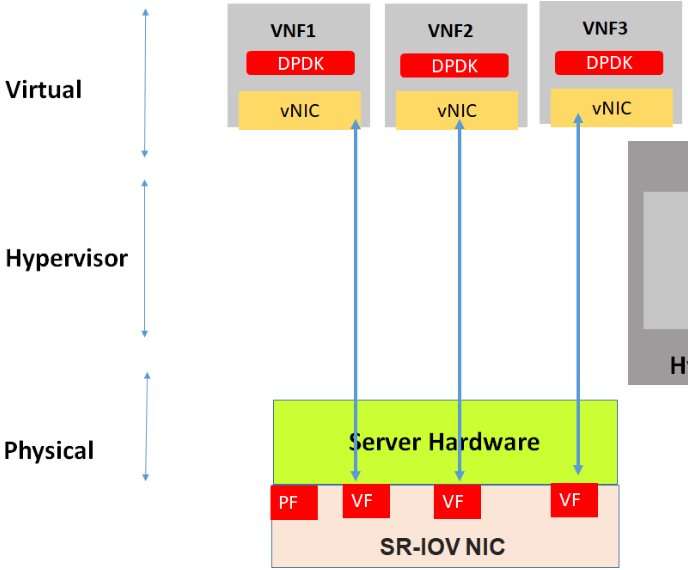
This post will talk

about the various building blocks available to speed up packet processing

both hardware based e.g.SR-IOV, RDT, QAT, VMDq, VTD

and software based e.g. DPDK, Fd.io/VPP, OVS etc and give

hands on lab experience

https://www.telcocloudbridge.com/blog/dpdk-vs-sr-iov-for-nfv-why-a-wrong-decision-can-impact-performance/

EMQX单节点吞吐量 EMQX 5.0 23个节点的集群支持:(100 million MQTT连接 + 1 million message)每秒 每个节点的吞吐量为4万每秒 The dispersed nature of the Internet of Things (IoT) presents a major operational challenge that is uncommon in the traditional Internet or enterprise networks[5]. Devices that are managed together — say a fleet of railcars — are not physically colocated. Instead, they are widely geographically distributed. The operational approaches for management and security used in enterprise networks, where most hosts are densely contained in buildings or campuses, do not translate to the IoT.

VPC之间的连接方式

  • 专线

  • VPN托管服务

  • VPN Peering

  • 自建或第三方VPN

  • PrivateLink

VPC与私有网络之间的连接方式

  • VPN托管服务

  • 专线

  • 专线+VPN

  • 自建或第三方VPN

  • Transit VPC

  • VPN Hub

邮枪Concept plan(免费用户并增加一张信用卡)额度介绍

  • 每月免费发送1万封邮件,超过1万封的邮件开始收费,$0.5//1000封
  • 接收邮件免费
  • 支持一千个定制域名
  • 可以向任何邮箱地址发送而不用授权

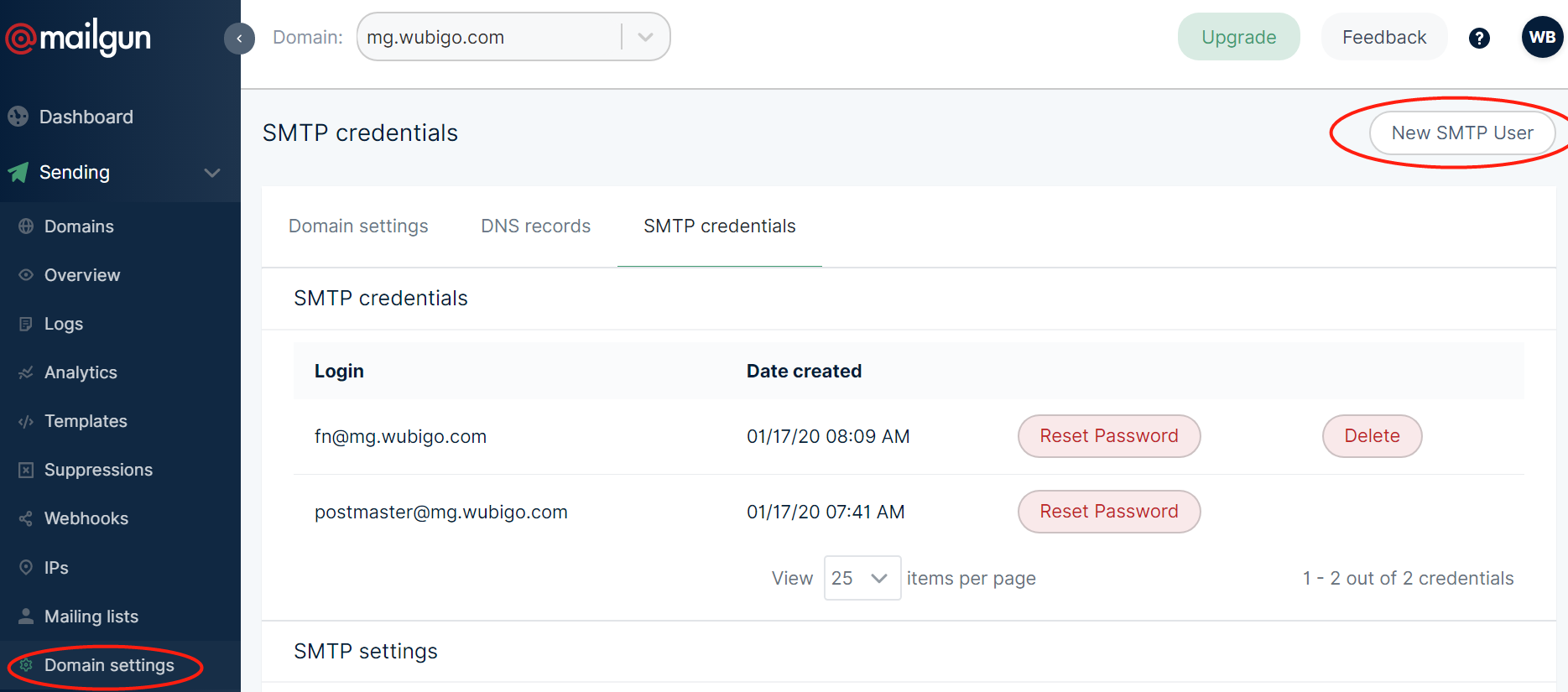
创建发送账号

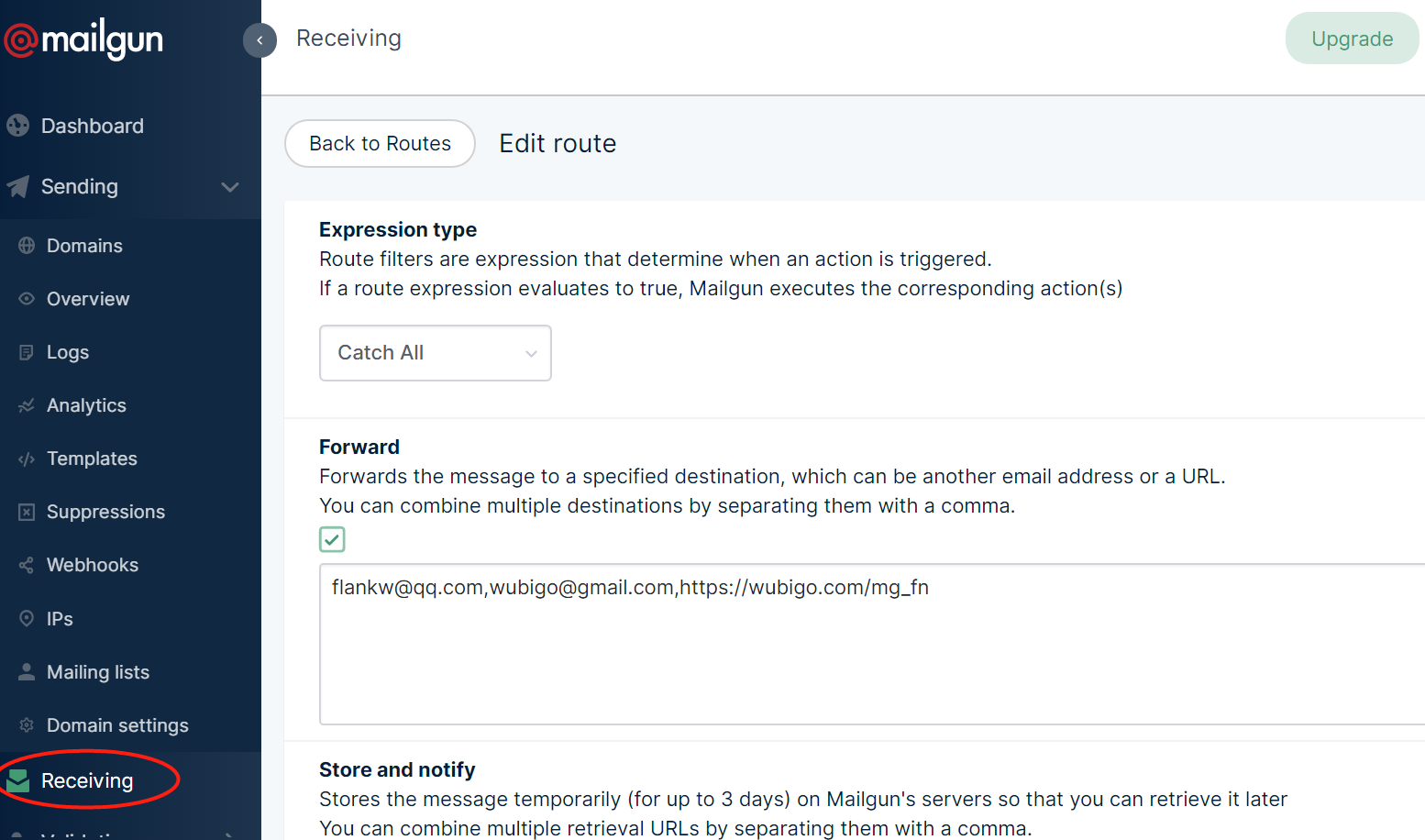
接收邮件

邮枪Concept plan(免费用户并增加一张信用卡)额度介绍

  • 每月免费发送1万封邮件,超过1万封的邮件开始收费,$0.5//1000封
  • 接收邮件免费
  • 支持一千个定制域名
  • 可以向任何邮箱地址发送而不用授权

创建发送账号

接收邮件

邮枪Concept plan(免费用户并增加一张信用卡)额度介绍

  • 每月免费发送1万封邮件,超过1万封的邮件开始收费,$0.5//1000封
  • 接收邮件免费
  • 支持一千个定制域名
  • 可以向任何邮箱地址发送而不用授权

创建发送账号

接收邮件

邮枪Concept plan(免费用户并增加一张信用卡)额度介绍

  • 每月免费发送1万封邮件,超过1万封的邮件开始收费,$0.5//1000封
  • 接收邮件免费
  • 支持一千个定制域名
  • 可以向任何邮箱地址发送而不用授权

创建发送账号

接收邮件

依赖

go list -m all
go list -m -versions github.com/minio/cli

模块初始化 mkdir -p $GOPATH/src/github.com cd $GOPATH/src/github.com mkdir -p wubigo/API/go/hello cd wubigo/API/go/hello go mod init github.com/wubigo/API/go/hello 检查go.mod ll go.mod cat go.mod module github.com/wubigo/API/go/hello go 1.13 创建程序 hello.go package main import ( "fmt" "github.com/google/go-cmp/cmp" ) func main() { fmt.Println(cmp.Diff("Hello World", "Hello Go")) } package main声明该模块是一个可执行程序而不是共享库 编译测试 go install github.com/wubigo/API/go/hello 或者 go install . 或者 go install -n 检查go.mod go.mod module github.com/wubigo/API/go/hello go 1.

Set namespace preference kubectl config set-context $(kubectl config current-context) --namespace=<bigo> watch pod kubectl get pods pod1 --watch Check Performance kubectl top node kubectl top pod copy file between pod and local kubectl cp ~/f1 <namespace>/<pod-name>:/tmp/ kubectl cp <namespace>/<pod-name>:/tmp/ ~/ enable RBAC kube-apiserver - --authorization-mode=RBAC User CRUD openssl genrsa -out bigo.key 2048 openssl req -new -key bigo.key -out bigo.csr -subj "/CN=wubigo/O=bigo LLC" sudo openssl x509 -req -in bigo.

InnoDB

MySQL 5.1 shipping the older version of InnoDB, If you’re using MySQL 5.1, please ensure that you’re using the InnoDB plugin. It’s much better than the older version of InnoDB.

It now scales well to 24 CPU cores, and arguably up to 32 or even more cores depending on the scenario

Puppeteer vs Selenium/WebDriver Selenium/WebDriver focuses on cross-browser automation; its value proposition is a single standard API that works across all major browsers. Puppeteer focuses on Chromium; its value proposition is richer functionality and higher reliability. That said, you can use Puppeteer to run tests against Chromium, e.g. using the community-driven jest-puppeteer. While this probably shouldn’t be your only testing solution, it does have a few good points compared to WebDriver: * Puppeteer requires zero setup and comes bundled with the Chromium version it works best with, making it very easy to start with.

安装 sudo add-apt-repository ppa:wireguard/wireguard sudo apt-get update sudo apt-get install wireguard -y 打开安全组 南向Inbound rules(udp:51820) 配置 创建key wg genkey | tee privatekey | wg pubkey > publickey private_key=$(wg genkey) public_key=$(echo $private_key | wg pubkey) 配置 ip a 1: lo: <LOOPBACK,UP,LOWER_UP> mtu 65536 qdisc noqueue state UNKNOWN group default qlen 1 link/loopback 00:00:00:00:00:00 brd 00:00:00:00:00:00 inet 127.0.0.1/8 scope host lo valid_lft forever preferred_lft forever inet6 ::1/128 scope host valid_lft forever preferred_lft forever 2: eth0: <BROADCAST,MULTICAST,UP,LOWER_UP> mtu 9001 qdisc pfifo_fast state UP group default qlen 1000 link/ether 0a:81:39:72:97:90 brd ff:ff:ff:ff:ff:ff inet 10.

Death of Microservice Madness

http://www.dwmkerr.com/the-death-of-microservice-madness-in-2018/

how-to-allow-local-network-when-using-wireguard-vpn-tunnel 允许非隧道流量 Open the WireGaurd Windows client. In the left pane, select the tunnel that you want local network routing to work, if you have more than one tunnel. Hit the Edit button. Uncheck Block untunneled traffic (kill-switch) option 增加本地的网络 AllowedIPs = 192.168.0.0/16, 0.0.0.0/1, 128.0.0.0/1, ::/1, 8000::/1 安装 https://download.wireguard.com/windows-client/wireguard-amd64-0.0.38.msi 配置 更改公钥 Endpoint所在的vpn服务器地址 https://github.com/Nyr/openvpn-install https://github.com/hwdsl2/setup-ipsec-vpn https://wireguard.isystem.io/ https://github.com/meshbird/meshbird https://www.tinc-vpn.org/ https://github.com/isystem-io/wireguard-aws Download and install the TunSafe, which is a Wireguard client for Windows.

Hijack of Amazon’s domain service used to reroute web traffic for two hours https://doublepulsar.com/hijack-of-amazons-internet-domain-service-used-to-reroute-web-traffic-for-two-hours-unnoticed-3a6f0dda6a6f Socioeconomic group classification based on user features http://pimg-faiw.uspto.gov/fdd/83/2018/28/003/0.pdf The long, tortuous and fascinating process of creating a Chinese font (qz.com) https://qz.com/522079/the-long-incredibly-tortuous-and-fascinating-process-of-creating-a-chinese-font/ Announcing 1.1.1.1: the fastest, privacy-first consumer DNS service https://blog.cloudflare.com/announcing-1111/ Introducing Cloud Text-to-Speech powered by DeepMind WaveNet technology https://cloudplatform.googleblog.com/2018/03/introducing-Cloud-Text-to-Speech-powered-by-Deepmind-WaveNet-technology.html Announcing gRPC Support in NGINX https://www.nginx.com/blog/nginx-1-13-10-grpc/ ACME v2 and Wildcard Certificate Support is Live https://community.letsencrypt.org/t/acme-v2-and-wildcard-certificate-support-is-live PIXAR’S 22 RULES OF STORYTELLING https://www.

FROM centos:7
RUN echo "ip_resolve=4" >> /etc/yum.conf
RUN yum update -y && yum install -y java-1.8.0-openjdk
# 设置时区(日志、调用链)
RUN /bin/cp /usr/share/zoneinfo/Asia/Shanghai /etc/localtime
RUN echo "Asia/Shanghai" > /etc/timezone
ENV workdir /app/
ADD VERSION .

WORKDIR ${workdir}
# JAVA_OPTS环境变量JVM 启动参数,在运行时 bash 替换
# 使用 exec 以使 Java 程序可以接收 SIGTERM 信号。
CMD ["sh", "-ec", "exec java ${JAVA_OPTS} -jar ${jar}"]

DDoS 基础防护

腾讯云 DDoS 基础防护本身免费,当用户购买了腾讯云 CVM、CLB 等服务时,会自动开启 DDoS 基础防护。

普通用户提供2Gbps的防护能力,最高可达10Gbps

高防IP

高防包不需要更改客户业务 IP,高防IP需要客户将腾讯的高防 IP 作为业务 IP 发布;

高防包只能防护一台云主机或一台负载均衡( 1 个公网 IP),高防 IP 可防护多台云主机;

高防包只能防护腾讯云内设备,高防 IP 可防护非腾讯云设备